For additional instructions consult your manual
SMART s. 15-16, SMART+ s. 16-17, Phantom s. 17-18
For additional instructions consult your manual
SMART s. 17, SMART+ s. 18, Phantom s. 19
For additional instructions consult your manual
SMART s. 17, SMART+ s. 18, Phantom s. 19
2. Updating the Firmware
After updating the app, follow these steps:
Important: Keep pedaling throughout the firmware update to maintain the connection.
Ensure the pedal arm is in a horizontal position pointing forward.
Unscrew the pedals by turning them towards the back of the bike.
Before installing new pedals, check the markings: “L” for left and “R” for right.
To install new pedals
Ensure the pedal arm is in a horizontal position pointing backward.
Thread the pedal by hand toward the front of the bike to ensure proper fit.
Tighten the pedals with a 15 mm wrench with a force of 45 Nm.
*Note: Retighten pedals after the first week of use.
For additional instructions consult your manual
SMART s. 12-13, SMART+ s. 13-14, Phantom s. 13-14
For additional instructions consult your manual
SMART s. 21-22, SMART+ s. 22-23
Protects the BODY BIKE® indoor bikes in your fitness centre from perspiration and gives them a shiny finish.
The essential tools for assembling BODY BIKE SMART® and BODY BIKE SMART®+ in your fitness centre. Contents: 15 mm fork
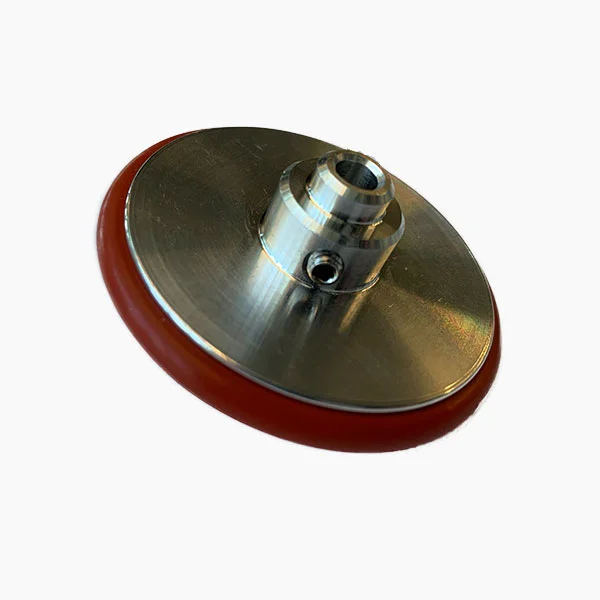
Aluminium wheel with silicone for BODY BIKE SMART®+ magnetic generator
For lubrication of the adjustment handles on BODY BIKE® Connect, Supreme, Classic (SS) and Design Cover. Make sure the adjustment
Added to cart
Check out our shop to see what's available